
Adsense Approved Captivating Blogger Template 2014

Captivating theme will attract your visitor toward sleek design on this theme.Design of this theme is adapted from studiopress themes.Captivating theme is having floating/Sticky header which will help you to drive attention of visitor towards advertisement banner.
Features
- Floating header
- Drop Down Menu
- Good looking Search Box
- Numbered page navigation
- 3 column footer
- Auto read more
- Social Media Buttons
- Best Heading & Block quotes style
- SEO Friendly
- Run In All Major Browser
- Threaded Comment Style
- And More..........
Customization
Drop Down Menu
To Customize drop down menu go to blogger dashboard>>Template>>Edit HTML>>Find
Below
Now Replace # with Link you want.
Footer Menu
To Customize menu above footer go to blogger dashboard>>Template>>Edit HTML>>Find
Below
Now Replace # with Link you want.
Social Media Buttons
To Customize Social Media Buttons go to Blogger dashboard>>Template>>Edit HTML>>Find
Below
I am giving this theme to you in free so please respect my work and don't remove footer link, if you will remove our link from this theme then we will take strict action against you"


Now Replace ## with Link you want.
Respect Work
I am giving this theme to you in free so please respect my work and don't remove footer link, if you will remove our link from this theme then we will take strict action against you"

Put AdSense in your blogs sidebar
Adsense blogs sidebarPut AdSense in your blog's sidebar
If you're new to AdSense and not too familiar with making modifications to your blog's template, you can follow these instructions for placing AdSense code in your blog's sidebar (using the Minima template as an example).
Assuming you have already signed up and been approved for a Google AdSense account, you should be able to log in here. Once you're signed in, click the AdSense Settings tab near the top of the page. To cut right to the chase, focus on these steps:
- Choose Your Ad Layout - To fit ads in your sidebar, it's best to choose one of the following ad layouts.
Button (125x125)
Skyscraper (120x600)
Wide Skyscraper (160 x 600)
Vertical Banner (120 x 240)
Small Rectangle (180x150) - Choose a color palette - They are very cleverly named but it's really just a matter of your preference.
- Copy your AdSense code - At the bottom of the page, there's a box with code in it. Highlight all of that code and copy it.
- Paste the code somewhere - Notepad or Text Edit or something like that is a good place for now.
- Go to Blogger.com and sign in - Choose the blog you want to put ads on and click the template tab.
- This is less of a step and more of a precaution - Copy your entire Blogger template and save it in Notepad or Text Edit just in case.
- Find the place in your template that says this; you might have to scroll down pretty far:
- Paste the AdSense code you saved earlier right after that part.
How to Get Google Adsense Membership Easily + Urdu Tutorial
Adsense Easily Google Membership TutorialHow to Get Google Adsense Membership Easily It's at ease to grow on track with AdSense and it no more than takes a small amount of minutes. You fill out one single online application and that's it. Once you're accepted, it takes no more than minutes to harden up AdSense; all you tolerate to figure out is cop and paste a designated block of HTML into the source code on behalf of your site. Once you figure out so as to, under targeted ads will start viewing up on your website.To fill out the online application, go to:https://www.google.com/adsense/application-1?apply=Click+Here+to+Apply/Urdu Tutorial
Top Tips For Optimizing Google AdSense Ads On Your Blog
Adsense Google OptimizingTop Tips For Optimizing Google AdSense Ads On Your Blog
 Setting up Google AdSense is the dream for many bloggers, especially beginners. The reason for this is, most people either don't know about, or don't have any alternate sources of income for their blogs. Hence, AdSense has become their go-to place when it comes to making a living online. A lot of people have asked me this; how to use AdSense correctly and earn more money through it? Indeed, when you think about it, it's no piece of cake. It requires much thinking and effort to do it correctly. From choosing the right colors to reducing you bounce rate, there's indeed a lot that can be done. In this post, I'll hopefully address some of the problems that people face.
Before starting off...
Patience, my friend. Some people, especially beginners, seem eager to set up AdSense ads. Too eager, in fact. So much so that they set up ads merely weeks after setting up their blogs, if they get approved, that is. What most fail to understand is, a high traffic is the key to AdSense. You can only benefit from these ads if you have a decent amount of traffic flowing. Prematurely setting up ads may do more harm than good. Not only will you generate little income, you existing traffic will stall as well. Why? Well,think about why Wikipedia is the leading source of information. It has no ads! Even if they were to start advertising now, it wouldn't make much of a difference. But sites that start anew, but incorporate ads from the very start lost their credibility.Secondly, earning online is a game of patience, where the impatient often tend to lose. Rushing into things will make things messy. The messier they are, the harder it is to extricate oneself from them. So being patient might pay off. Besides patience, you need to have determination, and the will power to work hard every day. And be ready to accept what you are getting. You need to make sure that you have a similar mind-set before setting up ads on your website.Optimizing your AdSense Ads
The "Above-The-Fold" strategy'Above-the-fold' refers to the visible part of a newspaper or magazine that is lying folded on a shelf or a table. In other words, its the area where the eyes first snap to. When a visitor lands on your page, he/she first looks at the top, left side of your website. Normally, this is where your page header and/or site navigation lies. If possible, use an ad banner directly below your header. People need to see your ads if they are going to click on them. Don't use any other major ad blocks in this region, though. Your site should not look cluttered with ad banners right from the top. A banner at the top and a smaller block in the sidebar is the maximum you should use. If your site looks cluttered with ads, your bounce rate may increase alarmingly, which should not be allowed.A word about ad unitsOpinion from various bloggers shows that the most popular ad blocks are; 330x250 for images, 336x280 for text ads, and 160x600 for side-bar banners. Use these different ad block sizes for the best performance.Ad placementAside from using ads in the above the fold region, you can place ads in other key areas. For example, above your posts as on this very page. Don't place ads in the middle of your content though. This is very annoying, even to a blogger-sympathetic person like me :P.
Click for more info; Best AdSense Ad Locations and Ad Formats To Earn Handsome RevenueMultiple ad units?Also, use a reasonable number of ad blocks. Don't use too many ads blocks. Google AdSense puts a limit on this number in the first place. But that doesn't mean you have to cap that limit. Just don't use so many ads that your website looks cluttered.Colors - very important!Most people over-look the importance of this simple point. Try out different color schemes with your ads. Contrasting colors are generally preferred. Some people try to fool their audience by using the same ad colors as their blog theme, and putting the ads hidden between their content. This does not fare well with the audience. Your ads must be clearly visible. Don't try to mess with the ads though. Adding stuff like borders won't make Google happy.Follow the rules!Google AdSense has some very strict rules and terms of services. Make sure you read them and adhere to them. In case of any violation, your account might get banned, which is one of Google's favorite things to do. Don't give them any reason. Don't click on your own ads, don't over-use ad blocks, don't use pop-up ads, etc.Use imagesPeople search for images almost as much as they search for text. Therefore, it is highly likely that visitors would stumble upon your ads through an image search. Upload high quality images to your log to increase your traffic and generating more income.Don't try to be smart :)You might be smart,but Google is smarter. It isn't the leading analytics provider without a reason. Using dynamic IPs and proxys to click on your own ads can still land you in trouble. Asking your friends to click daily won't do much good either. Google carefully monitors the click-through rate to audience ratio from a particular country. So if you are planning to out smart Google, forget it. You will most likely end up in trouble.And in the end......look at the picture below and learn something from it :) Be persistent, and determined. Otherwise, you're not going anywhere. Good luck with your online career. Cheers :)
Display Four Adsense Content Ad Units Per Page
Adsense Content Display UnitsDisplay Four Adsense Content Ad Units Per PageThis is a quick notice to all our readers who have been noticing more than three ad units on our blog and started doing a research on their own and applied methods that are strictly forbidden. Only selected publishers are allowed to display more than 3 ad units per page. We became Premium Adsense publisher just last month. MBT and all blogs under its network can now display as many ad units as required. Premium publishers are given privileges of both direct telephonic and Email correspondence. We receive suggestions related to ad placements directly from an appointed Google agent via telephone and email. All of you are requested to kindly not experiment on your own by reading articles online and making wrong use of Ad management services like Google's DoubleClick for Publishers (DFP) or third party services like LakeQuincy. In today's post we feel it's our responsibility to inform you all and educate you with Google Adsense Terms of Services.
Can you Display More Than 3 Content Ad units?
You can display as many ads as you want once you cross a certain earning threshold and become Google's loyal and trusted publisher by winning the title of premium Ad publisher. But if you have not received any call from Adsense team with a message of Congratulations right on your Mobile phone then you better wait for it and avoid following wrong shortcuts from wrong people.What are the wrong ways?
You will find a lot of debate on forums and blogs about whether or not services like DFP which enables you to display more than three Ad units are legal or not. DFP belongs to Google and DoubleClick offers a complete advertising revenue engine for end-to-end control and efficiency. Whether it may be DFP or DoubleClick Ad Exchange, all these tools help you to manage inventory across direct and indirect sales and make efficient use of every single impression. This services is largely recommend for those direct advertisers and publishers who want to control the Ads at advance level. Again this service is aimed for premium publishers who want to play with the numbers, sizes and formatting of Ad units and blend them more with their website design. Its not all intended for new publishers who are earning on average $100-$200 per month.Third part services like LakeQuincy make use of algorithms provided at DFP and offer their own ad management control panel. Again these services should be used unless you have worked well enough with Google and receive advices, feedback and suggestions straight from agents.Another method which is now banned by Adsense was the use of Iframes. Since each Iframe is a new window so publishers would often divide their page into different sections of iframes where each frame could display 3 ad units. This was the pop-up tradition which is now in complete violation of AdSense's TOS.Official AdSense Terms of Services
TOS documents are often long and written in court Law book style, but if you would like to go through the TOS for understanding clearly every section of the document then we strongly suggest you do so. Please read the Official TOS hereFollow AdSense Blog
To keep your self updated with latest news and developments and interesting stories please keep a close watch on Adsense Blog PostsMisleading Ad placements
Please follow these links to learn in detail which ad placements are in direct violation of their terms:- Encouraging accidental clicks
- Formatting content to mimic ads
- Aligning images with ads
- Placing ads under a misleading heading
- Placing ads to make it difficult to distinguish ads and content
- Ads in a software application
- Ads in emails
- Ads on pages behind a login
Adsense Optimization Tips
Please watch the following video for a quick startup guide for improving the performance of all your ad units and making some extra cash out of it by applying the correct tactics:Your views?
I had planned another post for today but then thought that informing you all with this topic was important. Please remember that you can display only three AdSense for content units on one web page. you can also place a maximum of three link units and two search boxes on each page. These Ad limits per page are for new users only but as soon as you cross the earning threshold and become a premium publisher you can then request for special changes without hesitation. Please let me know what other ways do you know which helps to display content ads greater than 3 per page. Do share your stories. Peace and blessings pals! :)
See also;How To Integrate AdSense In Google Custom Search Engine ?
Adsense Custom Engine Google Integrate SearchHow To Integrate AdSense In Google Custom Search Engine ?In our previous post we explained in detail the importance of Google custom search engine with regard to your website internal search and page views, its now time to monetize your search engine to further increase your AdSense for Search revenue. This search engine displays AdSense Ads when a visitor searches for a query at your site/blog, as shown in the screen shot below,
The ads when clicked or even if just viewed by the visitor will increase your Pay Per Click and Page Impressions earning. Now without wasting any further time lets now learn on how to associate your AdSense account with your Custom Search Engine account.How to Display Ads in Google Custom Search Engine?
After you have successfully created your custom search engine and installed it on blogger, you need to monetize it by following the simple steps below,1) Go To Manage CSE2) Click the Control Panel link close to the name of your search engine. In my case it is My Blogger Tricks as shown below,3) Then click the link Make Money at the left pane,4) The finally on the next window that appears simply click the option that says "I already have an AdSense account" and fill the simple form with your email ID, postal code and the last 5 digits of your mobile number that you submitted to AdSense while creating an account.5) Hit the Submit button and you are done!6) Log into your Adsense Account and simply click the link that may appear at the top of your dashboard which will ask you whether or not you wish to let the Custom Search engine to access your AdSense Ads. Simply click it and enjoy the happy new earning! =)Enabling AdSense on your blog
Adsense EnablingEnabling AdSense on your blog

To enable AdSense for your blog, click on the Earnings tab from the drop-down menu on your dashboard.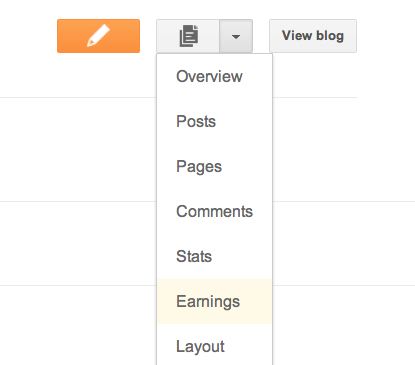 You’ll then see the AdSense overview page. If you haven’t signed up for AdSense yet, click Get started.
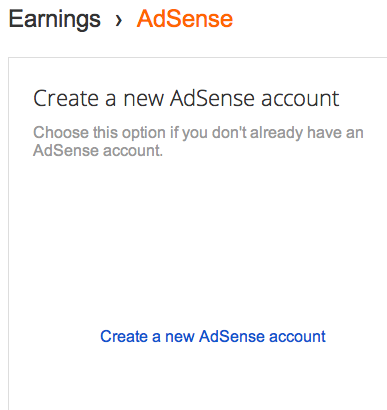
On the next page, click the link to “Create a new AdSense account.”
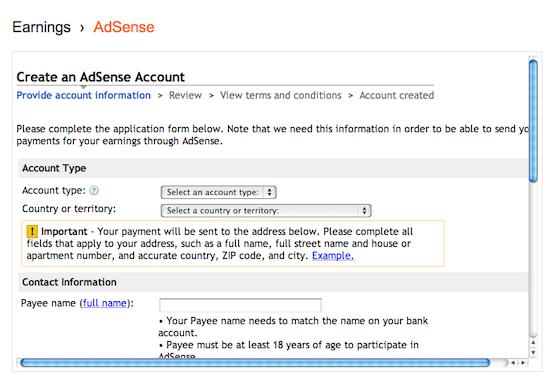
 Complete the application form, review the information you've provided, and then agree to terms and conditions.
 Ads will not appear on your blog until your application has been approved. Once you receive confirmation that your application was approved, you can control the ways the ads show up on your blog through the settings on the Earnings tab at anytime. It’s up to you whether or not to show ads, and where on your blog to display those ads (sidebar and posts, just sidebar, or just posts) if you’re using Traditional templates. Dynamic Views users can skip this step, as we’ve already optimized ad placement for Dynamic Views templates.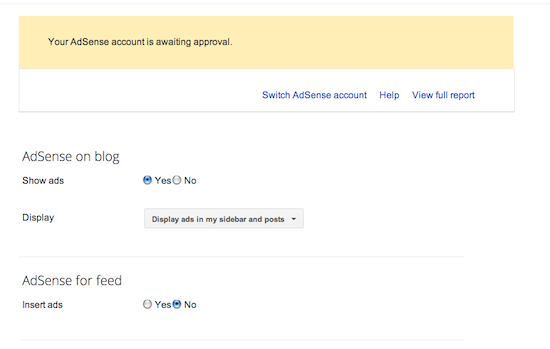
How To Collect Adsense Money From Western Union In pakistan [ Urdu / Eng ]
Adsense Collect Money pakistan Union WesternHow To Collect Adsense Money From Western Union In pakistan
 What is payment by Western Union Quick Cash?Western Union Quick Cash is a payment method that allows you to receive your AdSense payments in cash using the worldwide Western Union money transfer service. Payments will be available for pick up at your local Western Union Agent the day after they are sent according to our normal payment schedule.This means that you won't have to wait for a check to arrive in the mail. Choosing to receive your payments by Western Union can also cut down on the bank fees and long clearing times associated with depositing checks.Your Western Union Quick Cash payment will be made in US dollars. However, at most Western Union Agent locations, you may have the option to receive your payment in your local currency. Conversion rates will be calculated according to the rate used by the Western Union Agent on the day you pick up your payment.To begin receiving your AdSense payments by Western Union Quick Cash, simply follow our instructions. Please note that at this time, this payment option is only available to individual publishers.Please also be aware that at this time AdSense does not charge you a fee if you choose to receive payments by Western Union Quick Cash.How do I pick up my Western Union Quick Cash paymentIn order to pick up your payment by Western Union Quick Cash, please complete the following steps:2. Call the Western Union Agent to confirm that they offer the Quick Cash service.3. Bring the following information with you:- a valid government-issued photo ID (Passport, Driver's license, National ID etc)- sender's information: Google Inc. 1600 Amphitheatre Parkway, Mountain View,California 94043, USA. Phone : 650-253-4000- amount of your payment, which you can find on your Payment History page- your unique MTCN (Money Transfer Control Number) which you can find byclicking on the 'details' link next to the Payment Issued line on your PaymentHistory page.When you go to the Western Union agent, please let them know that you would like to pick up a Quick Cash payment. Additionally, please remember to pick up your Western Union payment within 60 days of the payment date, or the amount will be credited back to your AdSense account.
How To Get Approved Google Adsense Easily!!!
Adsense Approved Easily GoogleHow To Get Approved Google Adsense Easily!!!Actually, Google Adsense is the best free way
to earn lot of money.because it easy to use and
owners can keeping target ads from Google ads and
getting earning by every clicks. If you have quality
and unique content in your blog, you can earn more.
There have lot of advertising campaigns, but in my
opinion Adsense easy and best. you can see other advertisers from here
Adsense Tips for getting approval.
Your website must good quality unique contents
First we have focus to quality of your content.if you don't have quality content, keep writing quality content. don't copy paste articles from other sites.don't include any program that violate Adsense program.Try to apply Adsense with 50 quality post.
Buy a Top Level domain.
Buy a top level domain for your blog,Its another requirement to approve Adsense. So try to buy top level domain like .com domain.
Get more quality traffic to your blog.
Before applying Adsense you must ensure about how much you get traffic. don't use any click exchange programs or payed traffic services. Just try to get natural traffic.
Create Privacy policy page.
You can create privacy policy page for your site. There have lot of site help you to create privacy policy page.
try with it and create new page and link with menu-bar.
Your website must fully launched.
Before applying adsense , you have to make sure your website gadget,widgets and other pages are arrange neatly.please ensure that before applying its live and functioning properly.
Use Real Personal Details
When you applying Adsense always use your real personal details.Some time Google Adsense team checking your domain Whois database with your personal details.Use your real name to payee name , because if you get approved Adsense then your payment cheques come with your payee name.If you used other name
you cannot change your cheque.
I think you got some idea about approving Adsense.This is my ideas.you can try it. It is easy way to earn money. If you got approved you can add ads to your website. Hope this help.Inscription à : Articles (Atom) - Paste the AdSense code you saved earlier right after that part.


 You’ll then see the AdSense overview page. If you haven’t signed up for AdSense yet, click Get started.
 Complete the application form, review the information you've provided, and then agree to terms and conditions.
 Ads will not appear on your blog until your application has been approved. Once you receive confirmation that your application was approved, you can control the ways the ads show up on your blog through the settings on the Earnings tab at anytime. It’s up to you whether or not to show ads, and where on your blog to display those ads (sidebar and posts, just sidebar, or just posts) if you’re using Traditional templates. Dynamic Views users can skip this step, as we’ve already optimized ad placement for Dynamic Views templates.
