Affichage des articles dont le libellé est Comments. Afficher tous les articles

Facebook Magic Comments Code - Show FB Magic To Your Friend

Facebook Magic Comments Code Trick
 Amaze your friend With This Facebook Magic Status Trick
 Hello Bloggiyan & Facebook Lover! Now days you are seeing Magic status in Facebook are very popular. Everyone are shocked how does it work. Actually this is very old Trick, some people are very scared and say this is a virus or by doing this anyone can lose their account but don`t worry this is a simple script. so I here  telling you how it work

Actually this magic trick is a Facebook script which is only read by Facebook. Whenever a website become very popular and want to secure more then, that Particular site using own code and no one can understand easily. Everyone knows that every things is distinguish in Facebook via a particular id or number like your profile id, any page id.
http://www.facebook.com/profile.php?id=100005966286044
whenever you comment/write like @[100005966286044:] ,it will convert that name behind this unique id. In this it become S2free Blog spot

How to Find Your Numerical Facebook ID

So if you want your magic like this you can make.

Example:-
•          copy this code
•          I Like @+[427036347319427:0:]
•          Paste in your Facebook status.
•          Delete +
•          press enter
•          See magic.
Result:- you will see  I Like All Blogger Tricks and Tips
Note: 100005966286044 is unique page id of s2free.blogspot.com
 fan page at Facebook.
if you want to make yours just need to get the unique  id of content like your name in magic so you need your profile id. 
How To Get Unique Id Follow Steps or Check This Post
•          Go to your home page or wall in Facebook
•          See your browser url
•          there is a long number something  like id=**********
•          This is your unique id.
For those who have Facebook usernames
•          Go to wall and right click on view as tab at right and copy link address.
•          paste it on notepad and get the number after views=**********
I hope You like this Trick & post
How To Add Google+ Comments On Blogger Template

How To Add Google+ Comments On Blogger Template In Few Click
[ No Code Needed ]


There are no internet users who don’t know about Google. We also know that Google has many products and they keep improve them every hours of a day. They have improved blogger interface a lot now they are trying to upgrade bloggers comment system with the help of Google+. Now blogger users can add Google+ comments system on their blogger websites/blogs.  Before we had only two alternatives for bloggers comments system one is Disqus and another is Facebook comments. Now the biggest giant of internet Google also entered in this field. This going to real challenge for Disqus and Facebook

There are many blogs teach you how to add Google+ comments system on your blogger blog. But there just telling you to enable Google+ comments system from blogger Google+ option. But this method only work for default template users which are using blogger default template. This won’t work for custom template users who use stylish blogger template. But I am going to show you a real way to add Google+ comments on your custom and default blogger template.

Step To Add Google+ Comment Box on Any Blogger Template

 Just Follow Clicks As Showing In Pic  


Save Done !
Enjoy Blogging Keep Sharing With Bloggiyan


Add Recent Comments Widget For Blogger Sidebar With Image

How To Add Recent Comments Widget For Blogger Sidebar With Image

https://blogger.googleusercontent.com/img/b/R29vZ2xl/AVvXsEj5griLCmovxIssBPJIC7PGQsQ45ye4TlJ8aN2_nFvzwDaIGTOtE8PIXJWbdkgJxlucixKfr-r5Cq0GMHD2CSZWSuVzjtvBuvbSVEMZeYKOx4GyWe69Sxxm0ZFvuY0bRIcu0AdCdoFBcjg/s1600/Recent+Comments+with+Avatar.png

Recent Comments Widget with Avatar for Blogger/Blogspot

 Recent Comments widget with Avatar for Blogger Blogs. Recently Blogger updated the Comments API for   In this widget we can show the Avatar of Commenter using the updated the Comments API. as you seen my Recent Comments Widget, this is looks exactly same to my Recent Comments Widget.
In this Widget i included the Comment Excerpts and Avatar Image. you can choose default Anonymous Avatar Image also.

Take A look :- 


 How To Install The Recent Comments Widget with Avatar For Blogger

Step 1. Go to your Blogger Dashboard >> Layout >> Add a Gadget


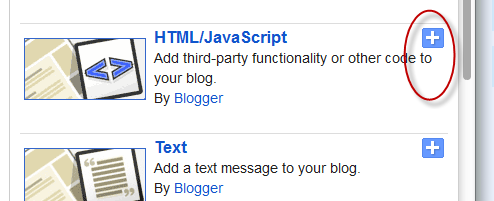
Step 2. From the pop-up window, scroll down and choose the HTML/JavaScript option:


  Step 3. Now copy and paste the below code in the HTML/JavaScript box:


Step 4. Replace your-blog-name with your blog url.

Step 5. Click Save and you're done.


Hope you'll enjoy it!

How to Enable Google Plus Comments in Blogger

 How to Enable Google Plus Comments in Blogger 

If you are a Blogger user, you can now add Google+ Comments to your blog. Google announced the new commenting system today, which brings an experience Google+ users should be familiar with. Google+ Comments offer deep integration with the social network, and some nifty features. Publishers that enable the new commenting system will see people’s activity from those directly on the site and those who are talking about the content right from Google+. Additionally, readers can leave comments specifically for those in their circle or in public depending on how comfortable they feel.

How to Enable...

Once you enable Google+ Comments, people can share the comments they make on your blog to their circles in Google+, helping you reach people that they know. And there's more: mentions of your posts on Google+ automatically show up right in your blog's comments, so you can see more of people’s public conversations about your content (and private conversations you’re part of).
Here's how to add Google+ Comments to your blog:
  1. Sign in to Blogger
  2. Click on the “Google+” tab in your blog’s Dashboard
  3. Upgrade to Google+ if you haven’t already done so
  4. Enable Google+ Comments. Comments already made on your posts will keep working in the new widget
This comment system is very flexible with blogger, Now you can get rid of that old ugly commenting system. Happy Blogging :D