Affichage des articles dont le libellé est Numbered. Afficher tous les articles

Shape Change Page Numbered Navigation Widget For Blogger

Changing Shape On Mouse Over Page Numbered Navigation Widget For Blogger 

Hi Bloggiyan! If you are searching Stop your search now, You Found Unmatched Page Navigation widget . Its style totally different with other of our previous Page Navigation post, Its changed shape on mouse over and user will like to click it . we are also planning to implement this widget on our blog. what can we do more now you can add this widget in just 1 simple step.

Above is animated picture preview, We also prefer to save user time that's why we make animated preview instead of clicking demo link . Lets Start adding this widet.

Easy Step to add Shape change Page Number Navigation.


1. Go to blogger dashboard.
2. Click on layout.
3. Choose add a gadget.
4. Choose HTML/JAVASCRIPT.
html javascript widget blogger
5. Copy the below code and paste it.


5. Save Done!

Post Your Comments And Ideas 

Numbered Page Navigation For Blogger With Css Hover Effect

 Numbered Page Navigation For Blogger With Css Hover Effect 

Numbered

This is awesome page navigation for blogger with Css hover effect even I am also using this widget for my blog you can see this at last of my blog.

This only don't add numbered but i also modify post older,home and newer links.

To add this widget to your blog follow below steps-

Step 1

  1. Go to Design > Edit HTML > Check mark Expand Widget Templates and Find
  2. Paste below code before the above line.

<b:includable id='page-navi'>

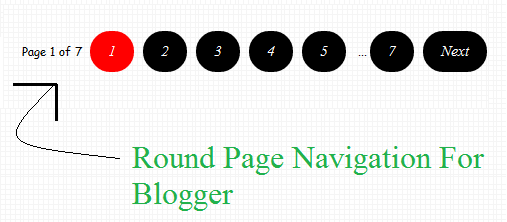
Stylish Round Numbered Page Navigation For Blogger

 Stylish Round Numbered Page Navigation For Blogger 

Stylish Round Numbered Page Navigation For Blogger

Live Demo

Every one want to insert stylish Numbered Page Navigation to blogger because blogger is not providing numbered page navigation.There are several tutorial provided for this type of page navigation for blogger but they are very hard to understand,This navigation menu are having round numbers and on hover there color changes.You can Install this navigation menu easily by following two simple steps-

Follow Below Steps to add this Stylish Round Numbered Page Navigation Menu to your Blog-

Step 1

  • Go To Blogger Dashboard
  • Click On Template Tab
  • Now Click On Edit HTML>>Proceed
  • Now Find ]]>
  • Paste Below Code Above ]]>

.blog-pager,#blog-pager{font-family:"Times New Roman", Times, serif;font-weight:normal;font-size:12px;width:700px;padding:17px;}
.showpageNum a,.showpage a {background:#000; color:#FFF; margin-right:.6em;text-decoration:none;font-size:15px;font-style:italic;line-height:0;text-align:center;padding:12px 18px 12px;-moz-border-radius:36px;-webkit-border-radius:36px;border-radius:36px;}
.showpageNum a:hover,.showpage a:hover {background:#FF0000; color:#FFF; margin-right:.6em;text-decoration:none;font-size:15px;font-style:italic;line-height:0;text-align:center;padding:12px 18px 12px;-moz-border-radius:36px;-webkit-border-radius:36px;border-radius:36px;}
.showpageOf{margin:0 8px 0 0;font-family:'Coming Soon', cursive;text-decoration:none;font-size:100%;}
.showpagePoint {background:#FF0000; color:#FFF; margin-right:.6em;text-decoration:none;font-size:15px;font-style:italic;line-height:0;text-align:center;padding:12px 18px 12px;-moz-border-radius:36px;-webkit-border-radius:36px;border-radius:36px;}

Step 2 

  • Now Find
  • Paste Below Code Above